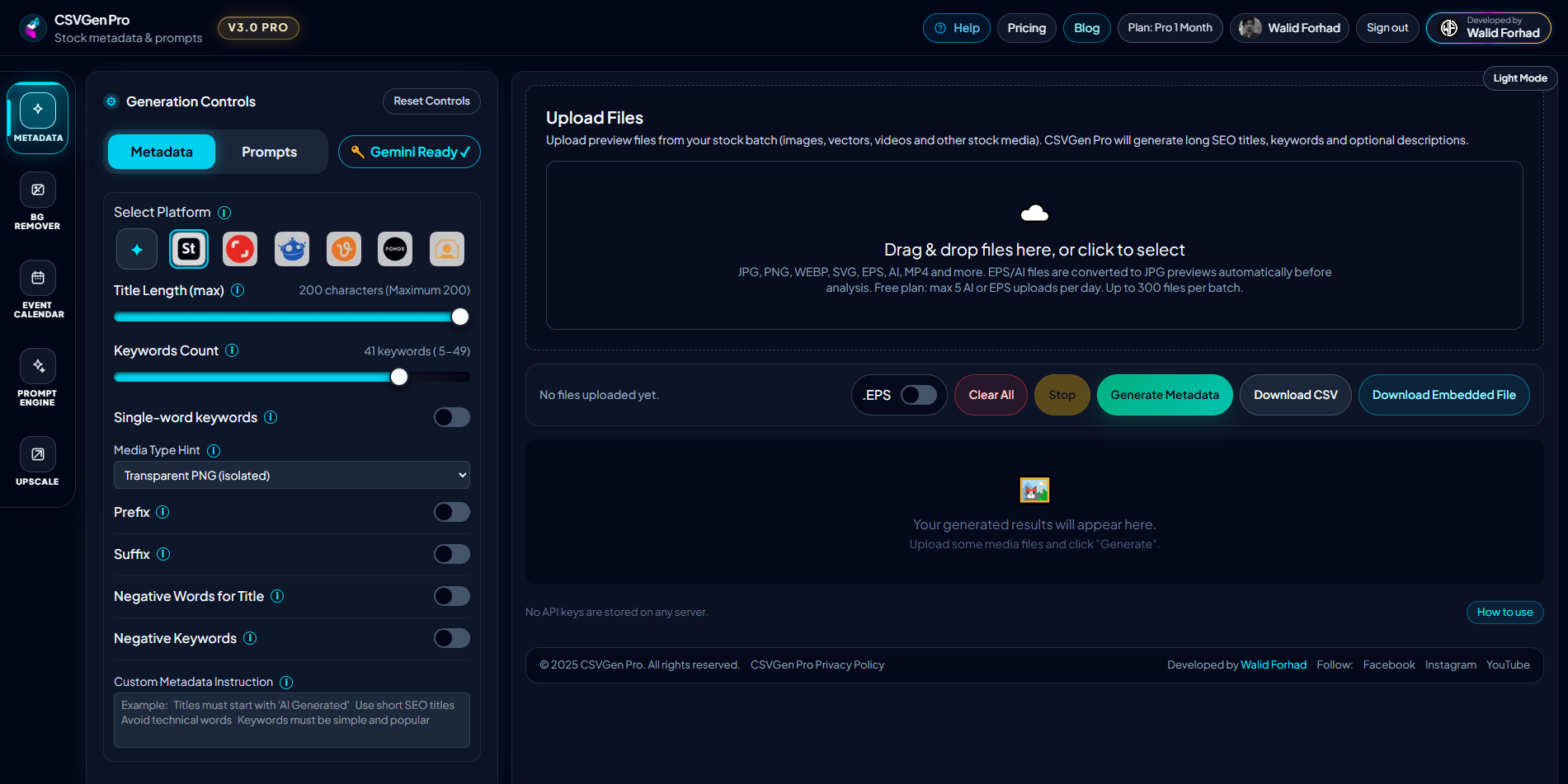
Metadata Generator
Generate stock-ready titles, descriptions, keywords, prompts, and platform-friendly CSV exports. This is the core workflow for contributors and agencies managing large submission batches.
Generate stock-ready metadata faster, then support your workflow with prompt generation, AI image upscale, and contributor-focused event planning from one workspace.
CSVGen Pro is built around its Metadata Generator for stock photographers, designers, agencies, and content teams. Create titles, descriptions, keywords, categories, prompts, upscale-ready assets, and export-ready CSV files for Adobe Stock, Shutterstock, Freepik, Vecteezy, Pond5, 123RF, and broader marketplace workflows.
Free tier available • No credit card required • Instant access
Services
Generate stock-ready titles, descriptions, keywords, prompts, and platform-friendly CSV exports. This is the core workflow for contributors and agencies managing large submission batches.
Monitor your Adobe Stock assets, track portfolio downloads, and analyze top-selling contributor trends directly with our dedicated stock tracking utility.
Create detailed stock-image prompts for photo, vector, illustration, isolated assets, icons, and commercial concept work with larger local variation pools.
Enhance PNG, JPG, JPEG, and WEBP files with focused AI image upscaling, flexible scale control, output format options, and a cleaner desktop-style workflow for sharper delivery assets.
Plan seasonal uploads with contributor-focused event timing, keyword stacks, creative direction, and market-aware publishing windows.
Workstation Preview
CSVGen Pro is built around metadata generation for stock contributors. Titles, descriptions, keywords, categories, and prompt support stay structured for real submission workflows instead of generic AI output.
Process large contributor batches with consistent structure, export order, and submission-ready formatting. CSVGen Pro is designed to reduce repetitive metadata work across growing catalogs.
Move from idea to submission faster by pairing metadata generation with your stock prompt workflow. Build prompts, then turn finished visuals into exportable metadata from the same platform.
Use the Upscale tool to enlarge softer source files, improve presentation quality, and prepare sharper submission assets before export, preview, or client delivery.
Use Upscale for sharper deliveries, Prompt Engine for ideation, and Event Calendar for timing uploads around real commercial demand windows.
Keyword sets, descriptions, and titles are shaped for stock search relevance, marketplace readability, and contributor-friendly editing before export.
Your API keys remain in your browser and are never stored as plain server credentials. The workflow is designed to minimize exposure while still enabling fast metadata generation and export.
Free plan has daily limits. Paid plans include the same full service with unlimited access. Only time and price are different.
Starter
Good for starting with daily limits.
Most Popular
Unlimited access for active contributors.
Best Value
Same paid service with better long-term value.
One-Time Payment
Pay only for the time you need
No Card Saved
Zero card details stored
No Auto-Renew
Never charged automatically
Start with metadata, use the supporting tools where needed, and keep your stock submission process faster, cleaner, and more consistent.
Open the Metadata Generator to upload images or videos, organize files, and create stock-ready title, description, keyword, category, and prompt output.
Generate detailed stock prompts, upscale softer files for cleaner delivery quality, or check the Event Calendar to line up uploads with seasonal and commercial demand.
Download platform-ready CSV files, keep submission formatting cleaner, and move through your stock workflow with fewer manual edits and fewer context switches.
Export metadata in the exact schema and column order required by each stock platform, reducing rejection risk and manual correction time.
Adobe Stock
Shutterstock
Freepik
iStock
Dreamstime
Depositphotos
123RF
Alamy
Pond5
Vecteezy
Canva
Motion
Real feedback and ratings submitted directly by our active subscribers.
Only real reviews from verified PRO members are shown here.
Everything you need to know about CSVGen Pro. If you need the generator directly, open the workstation.
CSVGen Pro is a metadata-first stock contributor toolkit. Its main service is the Metadata Generator, supported by Prompt Engine, Upscale, and Event Calendar tools for a more complete production workflow.
Yes. CSVGen Pro supports Adobe Stock, Shutterstock, Freepik, Vecteezy, Pond5, General, and 123RF workflows with platform-oriented output settings and export logic.
Free users get monthly limits for metadata generation and AI or EPS metadata files, plus free daily image upscaling. Paid plans unlock unlimited access across metadata, exports, Prompt Engine, Upscale, and Event Calendar.
Yes. You use your own Gemini API keys for generation. Keys are stored locally in your browser and are not saved as server-side plain credentials by CSVGen Pro.
You can upload up to 500 files in a batch. Limits may vary by your active plan and AI/EPS usage.
Yes. You can manually edit titles, descriptions, keywords, and prompts before downloading CSV, so you retain full creative and compliance control.
The current live services are Metadata Generator, Prompt Engine, Upscale, and Event Calendar. Metadata remains the main service and primary workflow.